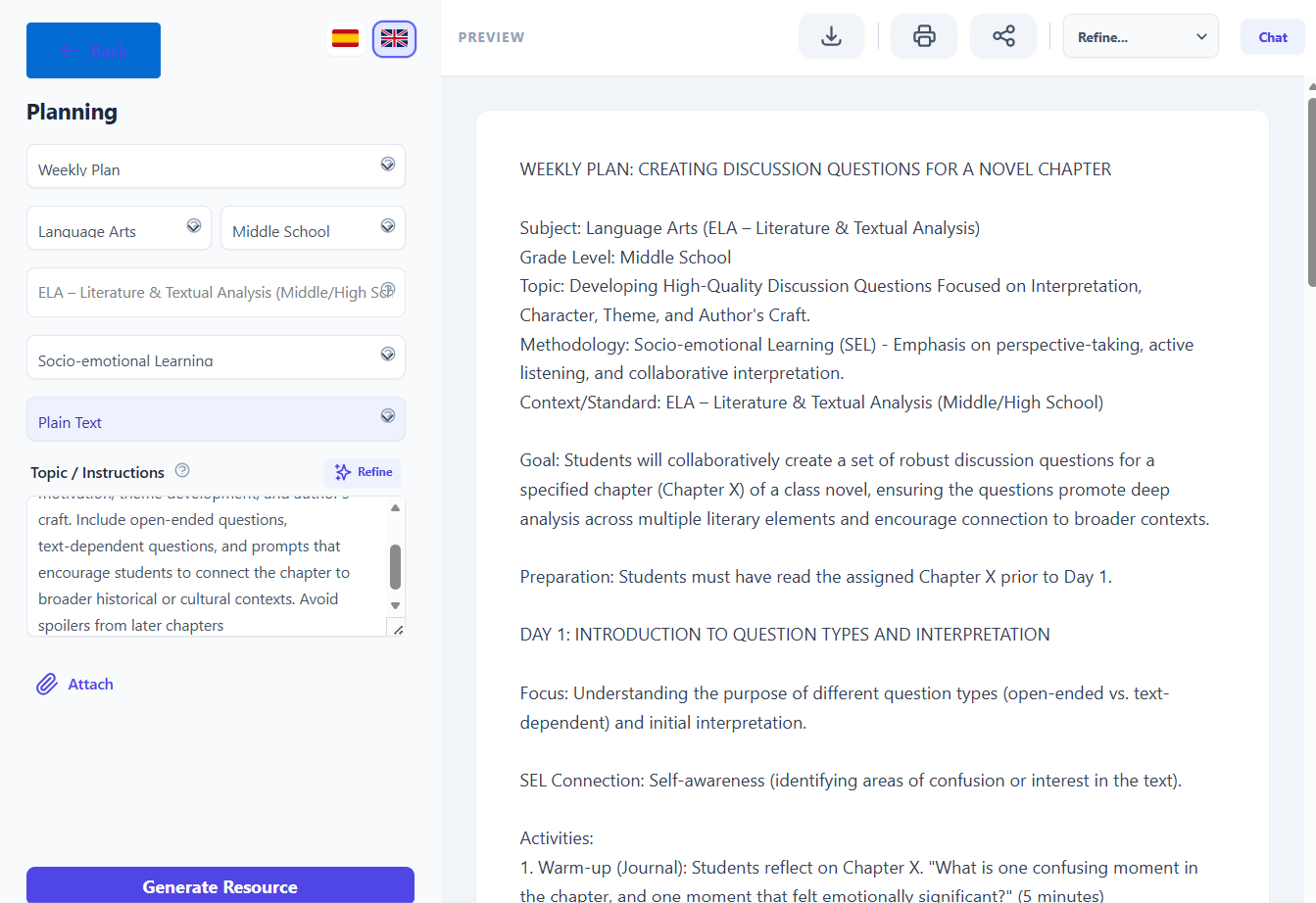
Step‑by‑step tutorial
Use case: “Necesito preguntas de debate para un capítulo de una novela”.”
1. Open Didaktos and go to Planning
- Log in to Didaktos.
- From the main menu, click “Planning”.
- On the Planning screen, select “Weekly Plan”.
2. Set curriculum, grade, and subject
-
Curriculum dropdown:
Click the first “Type…” field and choose “ELA – Literature & Textual Analysis (Middle/High School)”. -
Grade dropdown:
Choose “8th Grade” (or the grade level appropriate for the novel). -
Subject dropdown:
Select “Humanities / English Language Arts”. -
Format dropdown:
Make sure “Plain Text” is selected.
3. Write the topic / instructions
- Click inside the “Topic / Instructions” text box.
-
Type the following (or something very similar):
Create a set of discussion questions for a chapter of a novel. Focus on interpretation, character motivation, theme development, and author’s craft. Include open‑ended questions, text‑dependent questions, and prompts that encourage students to connect the chapter to broader historical or cultural contexts. Avoid spoilers from later chapters.
-
Optionally, add constraints such as:
- “Include at least two text‑dependent questions.”
- “Add one question connecting the chapter to historical context.”
- “Avoid advanced vocabulary.”
4. (Optional) Attach supporting files
- Click the “Attach” button.
- Select a file from your computer (chapter excerpt, teacher notes, reading guide).
- Confirm the upload so the file is linked to this planning request.
5. Choose language
- At the top right, click “English” so the discussion questions are generated in English.
- If you later want a Spanish version, switch to “Spanish” and regenerate or request a translation.
6. Generate the discussion questions
- Review all fields:
- Plan de estudios: ELA – Literature & Textual Analysis (Middle/High School)
- Grade: 8th Grade
- Asunto: Humanities / English Language Arts
- Formato: Plain Text
- Topic / Instructions: Your detailed request for discussion questions
- Click the “Generate Resource” button.
- Wait a few seconds while Didaktos creates the discussion questions.
7. Review and refine the result
-
Read the generated questions and check that they:
- Encourage interpretation and critical thinking.
- Address character motivation, theme, and author’s craft.
- Include text‑dependent prompts.
- Are appropriate for 8th‑grade Humanities students.
-
If needed, refine with follow‑up prompts, for example:
- “Add more open‑ended questions.”
- “Include a question about symbolism.”
- “Add a writing extension activity.”
8. Save, export, or reuse
- Save the discussion questions inside Didaktos (e.g., “Save” or “Add to library”).
- Export as PDF, Word, or copy them into your LMS or discussion guide.
- Tag them as “Novel Study – Discussion Questions – Humanities” for future use.