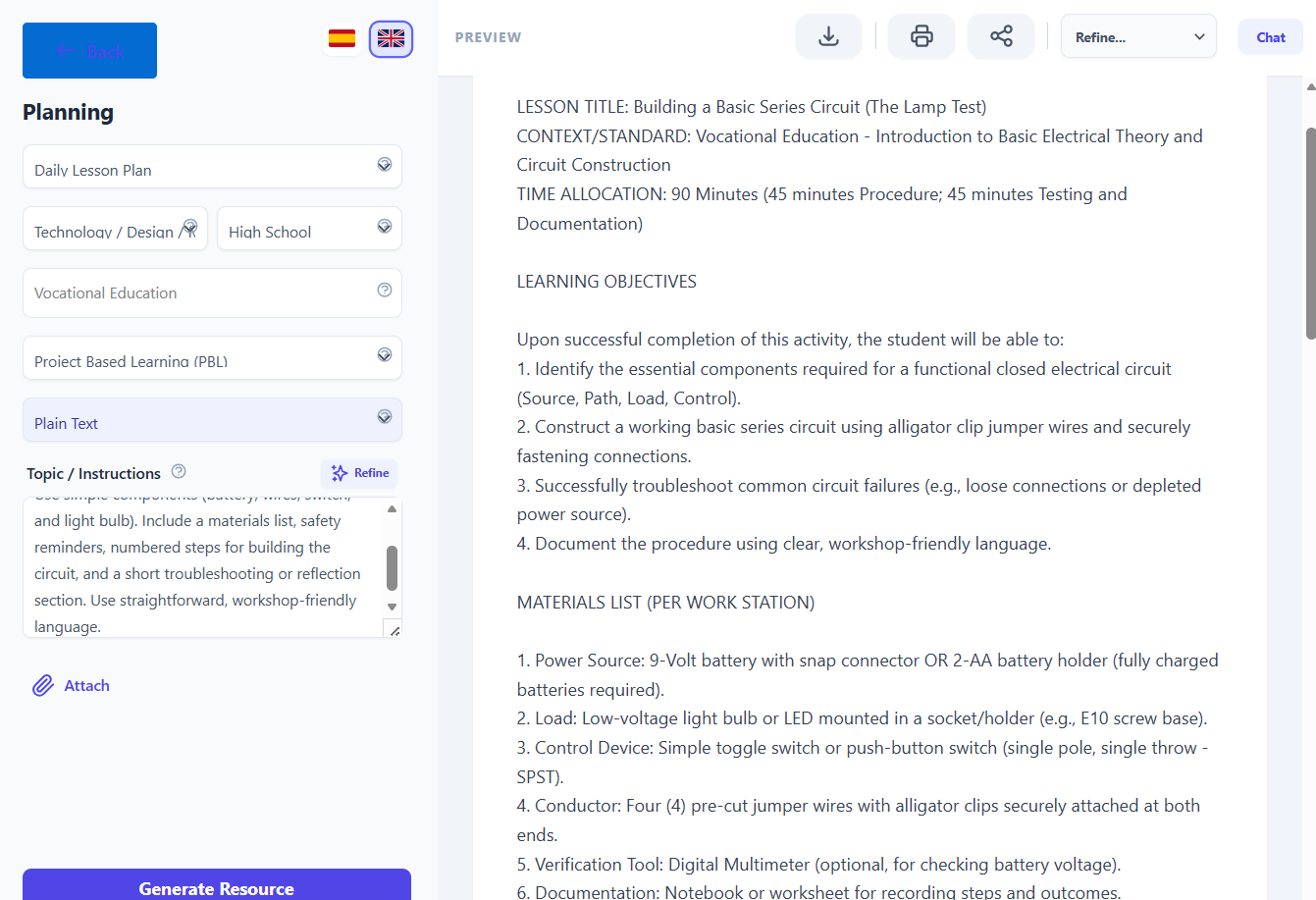
Step‑by‑step tutorial
Use case: “Necesito un procedimiento paso a paso para una actividad básica de circuito eléctrico”.”
1. Open Didaktos and go to Planning
- Log in to Didaktos.
- From the main menu, click “Planning”.
- Select “Daily Plan” to create a hands‑on vocational activity.
2. Set curriculum, grade, and subject
-
Grade dropdown:
Select “9th–10th Grade / Introductory Vocational Group”. -
Subject dropdown:
Pick “Vocational Education”. -
Format dropdown:
Ensure “Plain Text” is selected.
3. Write the topic / instructions
- Click inside the “Topic / Instructions” text box.
-
Enter the following (or a similar version):
Create a clear, step‑by‑step procedure for a basic electrical circuit activity for beginner students. Use simple components (battery, wires, switch, and light bulb). Include a materials list, safety reminders, numbered steps for building the circuit, and a short troubleshooting or reflection section. Use straightforward, workshop‑friendly language.
-
Optional refinements:
- “Add a diagram description for the circuit.”
- “Include safety warnings at the start and end.”
- “Limit the activity to 30 minutes.”
4. (Optional) Attach supporting files
- Click the “Attach” button.
- Upload any relevant files (lab sheet, wiring diagram, safety checklist).
- Confirm the upload so it is linked to this Daily Plan request.
5. Choose language
- Select “English” at the top right for English‑language output.
- Switch to “Spanish” if you want a translated version later.
6. Generate the step‑by‑step procedure
- Review all fields:
- Plan de estudios: Vocational & Technical Education – Basic Electrical Systems
- Grade: 9th–10th Grade
- Asunto: Electrical Technology
- Formato: Plain Text
- Topic / Instructions: Your detailed request for a basic electrical circuit activity
- Click “Generate Resource”.
- Wait a few seconds while Didaktos creates the procedure.
7. Review and refine the result
-
Check that the generated activity includes:
- A materials list.
- Safety reminders appropriate for beginners.
- Numbered steps for assembling the circuit.
- A troubleshooting or reflection section.
-
If needed, refine with follow‑up prompts:
- “Add a labeled diagram description.”
- “Include a short quiz at the end.”
- “Adapt the activity for group work.”
8. Save, export, or reuse
- Save the procedure inside Didaktos.
- Export as PDF, Word, or copy it into your LMS or workshop binder.
- Tag it as “Electrical Circuit – Vocational – Daily Plan” for future use.