Step‑by‑step tutorial
Use case: “I need a 30‑minute activity to introduce fractions to 3rd graders.”
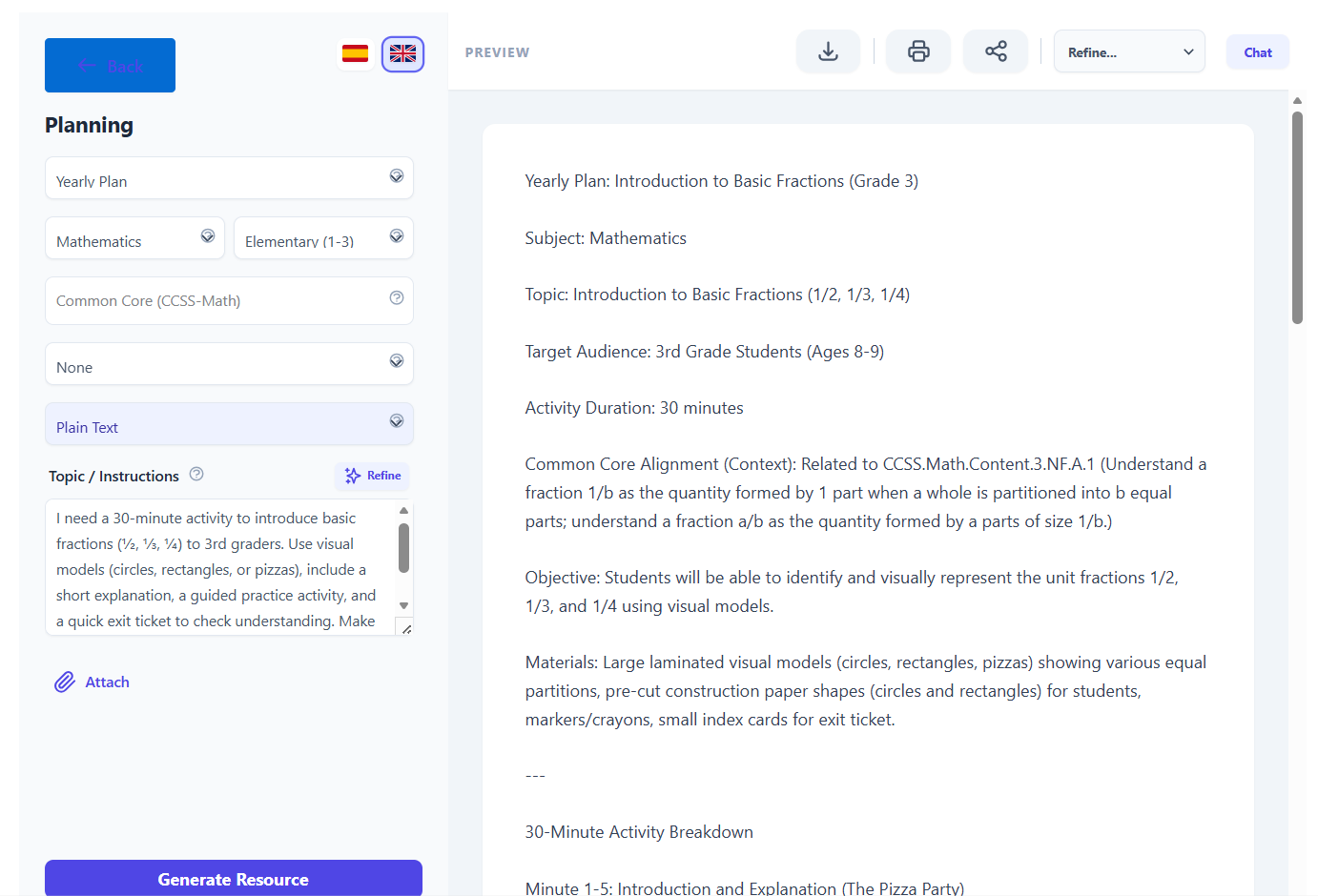
1. Open Didaktos and go to Planning
- Log in to Didaktos.
- From the main menu, click “Planning”.
- On the Planning screen, select “Yearly Plan”.
2. Set curriculum, grade, and subject
-
Curriculum dropdown:
Click the first “Select…” field and choose “Common Core (CCSS‑Math)” (or your local equivalent). -
Grade dropdown:
Click the second “Select…” field and choose “3rd Grade”. -
Subject dropdown:
Click the third “Select…” field and choose “Mathematics”. -
Format dropdown:
Make sure “Plain Text” is selected.
3. Write the topic / instructions
- Click inside the “Topic / Instructions” text box (where the placeholder says “E.g., Water cycle for 3rd grade…”).
-
Type the following (or something very similar):
I need a 30‑minute activity to introduce basic fractions (½, ⅓, ¼) to 3rd graders. Use visual models (circles, rectangles, or pizzas), include a short explanation, a guided practice activity, and a quick exit ticket to check understanding. Make it simple, concrete, and engaging for 8–9‑year‑olds.
-
Optionally, add constraints such as:
- “No homework.”
- “Materials: paper, colored pencils, scissors.”
- “Students have not seen fractions before.”
4. (Optional) Attach supporting files
- Click the “Attach” button.
- Select a file from your computer (syllabus, previous lesson, worksheet template).
- Confirm the upload so the file is linked to this planning request.
5. Choose language
- At the top right, click “English” so the activity is generated in English.
- If you later want a Spanish version, you can switch to “Spanish” and regenerate or request a translation.
6. Generate the activity
- Review all fields:
- Curriculum: Common Core (CCSS‑Math)
- Grade: 3rd Grade
- Subject: Mathematics
- Format: Plain Text
- Topic / Instructions: Your detailed request about a 30‑minute fractions activity
- Click the “Generate Resource” button.
- Wait a few seconds while Didaktos creates the activity.
7. Review and refine the result
-
Read the generated 30‑minute fractions activity and check that it:
- Introduces ½, ⅓, ¼ clearly.
- Uses visual models.
- Includes guided practice and an exit ticket.
-
If needed, refine with follow‑up prompts, for example:
- “Add more concrete examples with food (pizza, chocolate bars).”
- “Include differentiation ideas for struggling students.”
- “Add a quick 3‑question multiple‑choice exit ticket.”
8. Save, export, or reuse
- Save the activity inside Didaktos (e.g., “Save” or “Add to library”).
- Export as PDF, Word, or copy it into your LMS or slides.
- Tag it as “Math – Fractions – Intro – 3rd Grade” so you can reuse or adapt it later.