Step‑by‑step tutorial
Use case: “I need a creative art project for 5th graders using recycled materials.”
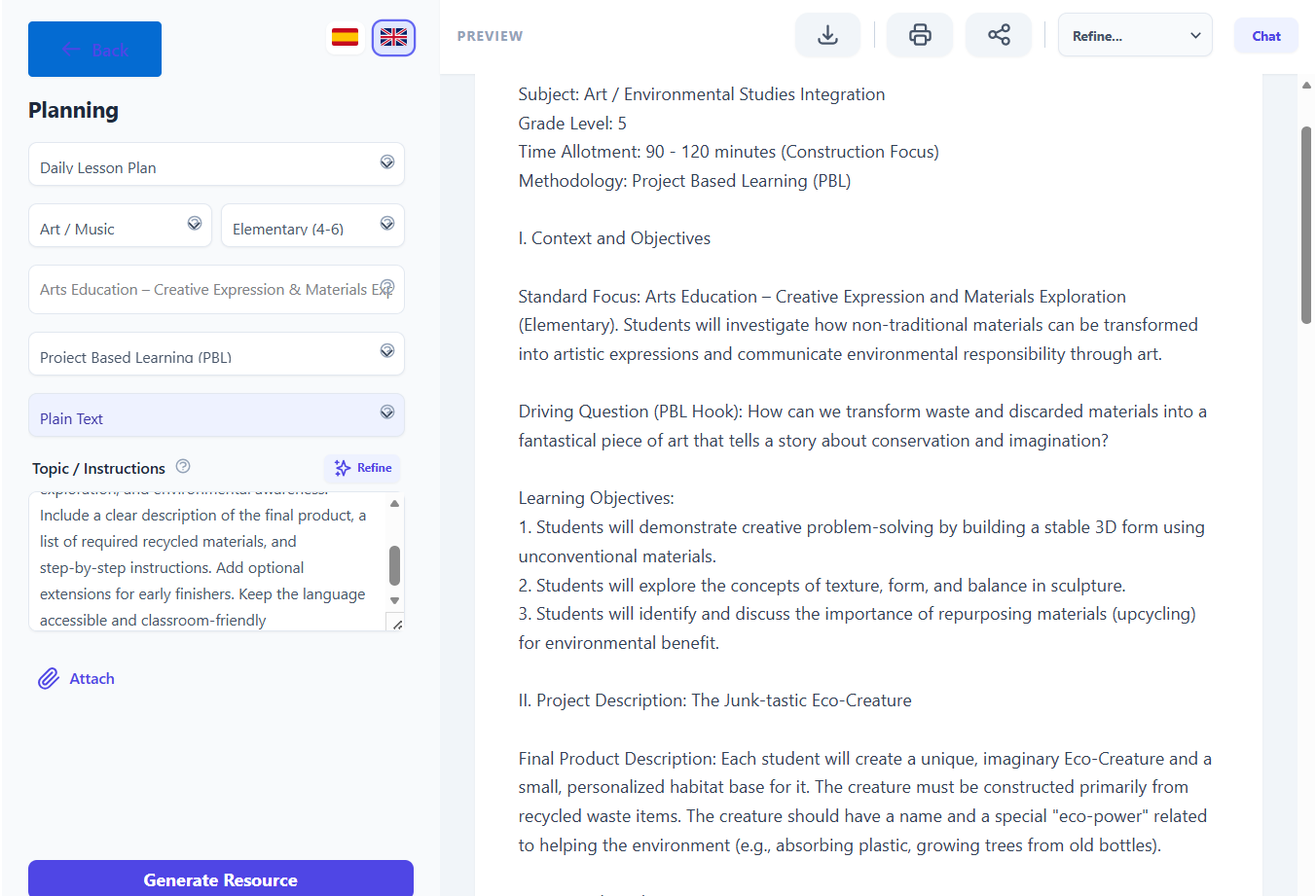
1. Open Didaktos and go to Planning
- Log in to Didaktos.
- From the main menu, click “Planning”.
- On the Planning screen, select “Daily Plan””.
2. Set curriculum, grade, and subject
-
Curriculum dropdown:
Click the first “Type…” field and choose “Arts Education – Creative Expression & Materials Exploration (Elementary)”. -
Grade dropdown:
Choose “5th Grade”. -
Subject dropdown:
Select “Creative Arts / Visual Arts”. -
Format dropdown:
Make sure “Plain Text” is selected.
3. Write the topic / instructions
- Click inside the “Topic / Instructions” text box.
-
Type the following (or something very similar):
Create a creative art project for 5th‑grade students using recycled materials. The project should encourage imagination, hands‑on exploration, and environmental awareness. Include a clear description of the final product, a list of required recycled materials, and step‑by‑step instructions. Add optional extensions for early finishers. Keep the language accessible and classroom‑friendly.
-
Optionally, add constraints such as:
- “Limit the project to one 45‑minute class.”
- “Use only materials commonly found at home or school.”
- “Include a short reflection prompt about recycling.”
4. (Optional) Attach supporting files
- Click the “Attach” button.
- Select a file from your computer (photos of examples, rubric, prior lesson plan).
- Confirm the upload so the file is linked to this Daily Plan request.
5. Choose language
- At the top right, click “English” so the project is generated in English.
- If you later want a Spanish version, switch to “Spanish” and regenerate or request a translation.
6. Generate the creative art project
- Review all fields:
- Curriculum: Arts Education – Creative Expression & Materials Exploration (Elementary)
- Grade: 5th Grade
- Subject: Creative Arts / Visual Arts
- Format: Plain Text
- Topic / Instructions: Your detailed request for a recycled‑materials art project
- Click the “Generate Resource” button.
- Wait a few seconds while Didaktos creates the project description.
7. Review and refine the result
-
Read the generated project and check that it:
- Uses recycled materials as the core of the activity.
- Includes a clear final product description.
- Provides step‑by‑step instructions.
- Is appropriate for 5th‑grade students.
- Encourages creativity and environmental awareness.
-
If needed, refine with follow‑up prompts, for example:
- “Add a simple assessment rubric.”
- “Include group‑work options.”
- “Adapt the project for outdoor space.”
8. Save, export, or reuse
- Save the art project inside Didaktos (e.g., “Save” or “Add to library”).
- Export as PDF, Word, or copy it into your LMS or printed instructions.
- Tag it as “Creative Arts – Recycled Materials – 5th Grade – Daily Plan” for future use.