
Chat lets you create teaching resources by simply describing what you need in natural language. Instead of filling out a form, you talk to Didaktos as if you were explaining your idea to a colleague. The AI understands your goals, asks for clarification when needed, and generates exactly what you’re looking for.
It’s the most flexible and creative way to work with Didaktos.
Why Chat Exists
Not every teacher wants to follow a structured form. Sometimes you have an idea in mind, but you’re not sure how to shape it. Chat helps by:
- Understanding open‑ended requests
- Helping you brainstorm ideas
- Asking follow‑up questions when needed
- Adapting to your teaching style and preferences
- Allowing you to refine the resource step‑by‑step
It’s like having a teaching assistant who listens and collaborates with you.
How Chat Works
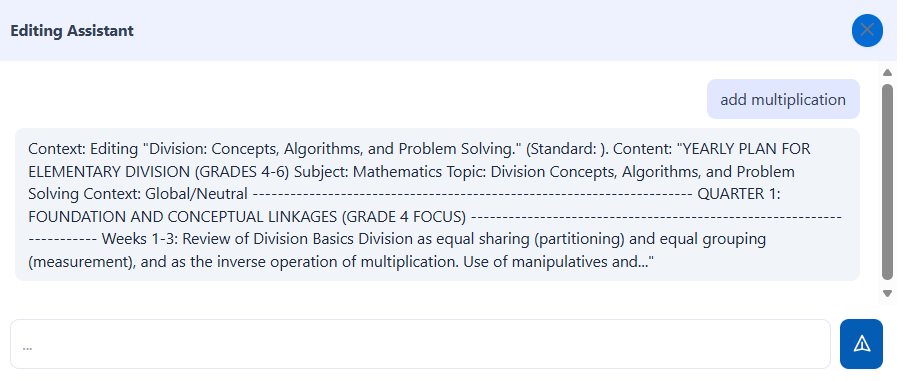
The process is simple and intuitive:
- Describe what you want to create
- Didaktos generates a first version
- You refine, adjust, or request alternatives
- The AI adapts the resource until it fits your needs
- You export the final version in your preferred format
You stay in control at every step.
What You Can Create with Chat
Chat can generate any type of teaching resource, including:
- Lesson plans
- Activities and worksheets
- Assessments and rubrics
- Multimedia descriptions and visual ideas
- Study guides and summaries
- Adaptations for different student needs
- Resources based on your uploaded materials
If you can describe it, Didaktos can help you create it.
When to Use Chat
Chat is ideal when you want:
- Creative freedom
- To brainstorm ideas with the AI
- To refine a resource step‑by‑step
- To adapt materials for specific students
- To transform your own documents into new resources
- To explore multiple versions of the same idea
Example scenario: “I need a fun way to introduce the concept of energy to 5th graders. Give me three ideas.”
Chat vs. Smart Forms
Both tools are powerful, but they serve different purposes.
| Chat | Smart Forms |
|---|---|
| Flexible and open‑ended | Structured and guided |
| Best for creativity and exploration | Best for predictable, consistent results |
| Ideal for refining and iterating | Ideal for fast, polished outputs |
| Great for advanced users | Great for beginners |
Tips for Better Conversations
- Start with a clear goal
- Give context (grade, subject, topic)
- Ask for alternatives if needed
- Request adjustments (“simplify”, “add examples”, “make it more visual”)
- Iterate until the resource feels right
Ready to Start a Conversation?
Open the AI chat and describe what you want to create.
Start Creating